Group Battle! in Hokkaido 2026 Summer
◼️Event Overview
“Group Battle! Machi Battle in Hokkaido 2026” is a team-based ranking event where groups of up to 5 members compete against each other based on the total “Group Points” earned during the season.
| Item | Details |
|---|---|
| Event Period | August 8, 2026 (Sat) 5:00 – November 3, 2026 (Tue/National Holiday) 17:00 (JST / UTC+9) |
| How to Participate | Tap “Events” from the PicTrée main screen, select “Group Battle! Machi Battle in Hokkaido 2026,” and join. *See later in this article for details. |
| Group Creation/Joining Period | July 3, 2026 (Fri) 13:00 – September 30, 2026 (Sun) 23:59 (JST / UTC+9) *Withdrawal from a group is also possible within the above period. |
| Rules | During the event period, rankings are determined by the total group points, calculated by adding up the cumulative rank points of each group member. |
| Group Ranking Rewards | Rewards are granted at the end of the event based on group rankings. Rewards are distributed to the group and split equally among members. |
◼️Group Ranking Rewards
Group Ranking Rewards will be distributed at the end of the season based on group ranking.
There are two types of “Group Ranking Rewards”:
・Shared Reward: A reward split equally among all group members based on the number of participants.
・Individual Reward: A reward given to every group member.
| Rank | Shared Reward | Individual Reward |
|---|---|---|
| 1st | 12,000,000 Reward Coins (equiv. 1,000,000 yen) | Wire 1000m ×3, Wire 500m ×5, Wire 200m ×10 |
| 2nd | 2,400,000 Reward Coins (equiv. 200,000 yen) | Wire 1000m ×3, Wire 500m ×5, Wire 200m ×10 |
| 3rd | 1,800,000 Reward Coins (equiv. 150,000 yen) | Wire 1000m ×3, Wire 500m ×5, Wire 200m ×10 |
| 4th | 1,200,000 Reward Coins (equiv. 100,000 yen) | Wire 1000m ×2, Wire 500m ×5, Wire 200m ×10 |
| 5th | 1,080,000 Reward Coins (equiv. 90,000 yen) | Wire 1000m ×2, Wire 500m ×5, Wire 200m ×10 |
| 6th | 960,000 Reward Coins (equiv. 80,000 yen) | Wire 1000m ×1, Wire 500m ×4, Wire 200m ×5 |
| 7th | 900,000 Reward Coins (equiv. 75,000 yen) | Wire 1000m ×1, Wire 500m ×4, Wire 200m ×5 |
| 8th | 840,000 Reward Coins (equiv. 70,000 yen) | Wire 1000m ×1, Wire 500m ×4, Wire 200m ×5 |
| 9th | 780,000 Reward Coins (equiv. 65,000 yen) | Wire 1000m ×1, Wire 500m ×4, Wire 200m ×5 |
| 10th | 720,000 Reward Coins (equiv. 60,000 yen) | Wire 1000m ×1, Wire 500m ×4, Wire 200m ×5 |
| 11th–20th | 360,000 Reward Coins (equiv. 30,000 yen) | Wire 500m ×4, Wire 200m ×5 |
| 21st–30th | 324,000 Reward Coins (equiv. 27,000 yen) | Wire 500m ×3, Wire 200m ×5 |
| 31st–40th | 288,000 Reward Coins (equiv. 24,000 yen) | Wire 500m ×2, Wire 200m ×3 |
| 41st–50th | 264,000 Reward Coins (equiv. 22,000 yen) | Wire 500m ×2, Wire 200m ×3 |
| 51st–60th | 240,000 Reward Coins (equiv. 20,000 yen) | Wire 500m ×1, Wire 200m ×3 |
| 61st–70th | 228,000 Reward Coins (equiv. 19,000 yen) | Wire 500m ×1, Wire 200m ×3 |
| 71st–80th | 216,000 Reward Coins (equiv. 18,000 yen) | Wire 500m ×1, Wire 200m ×3 |
| 81st–90th | 204,000 Reward Coins (equiv. 17,000 yen) | Wire 500m ×1, Wire 200m ×3 |
| 91st–100th | 192,000 Reward Coins (equiv. 16,000 yen) | Wire 500m ×1, Wire 200m ×3 |
| 101st and above | None | Wire 200m ×1 |
| 【Milestone】150th | 132,000 Reward Coins (equiv. 11,000 yen) | None |
| 【Milestone】200th | 126,000 Reward Coins (equiv. 10,500 yen) | None |
| 【Milestone】250th | 120,000 Reward Coins (equiv. 10,000 yen) | None |
| 【Milestone】300th | 114,000 Reward Coins (equiv. 9,500 yen) | None |
◼️How to Create and Join a Group
There are two ways to participate: “① Create a new group yourself” or “② Join an existing group.”
●If you are creating a new group:
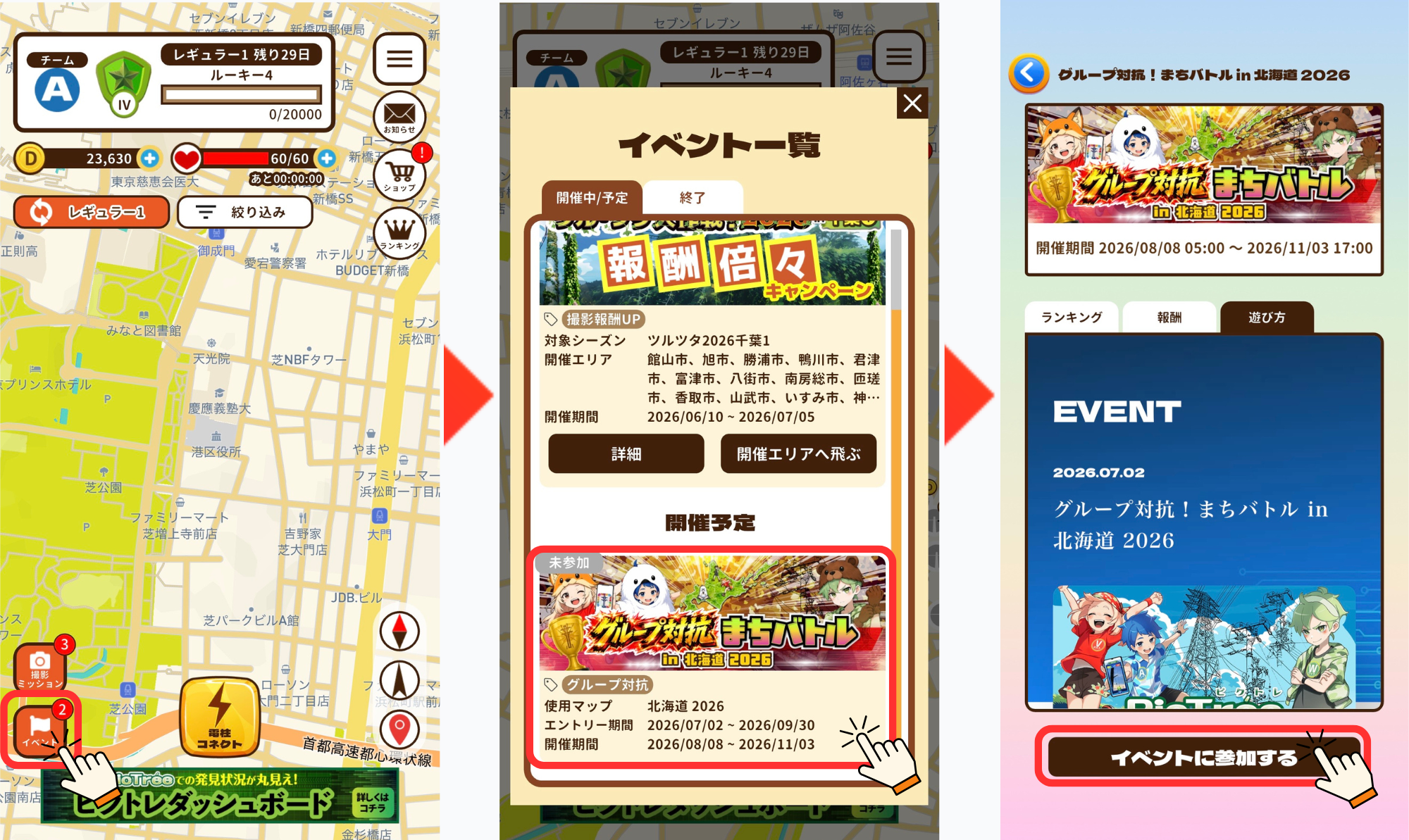
① After launching the app, tap “Events” in the lower left of the map screen.
② Tap “Group Battle! Machi Battle in Hokkaido 2026” in the “Event List.”
③ Tap “Join Event” at the bottom of the screen.
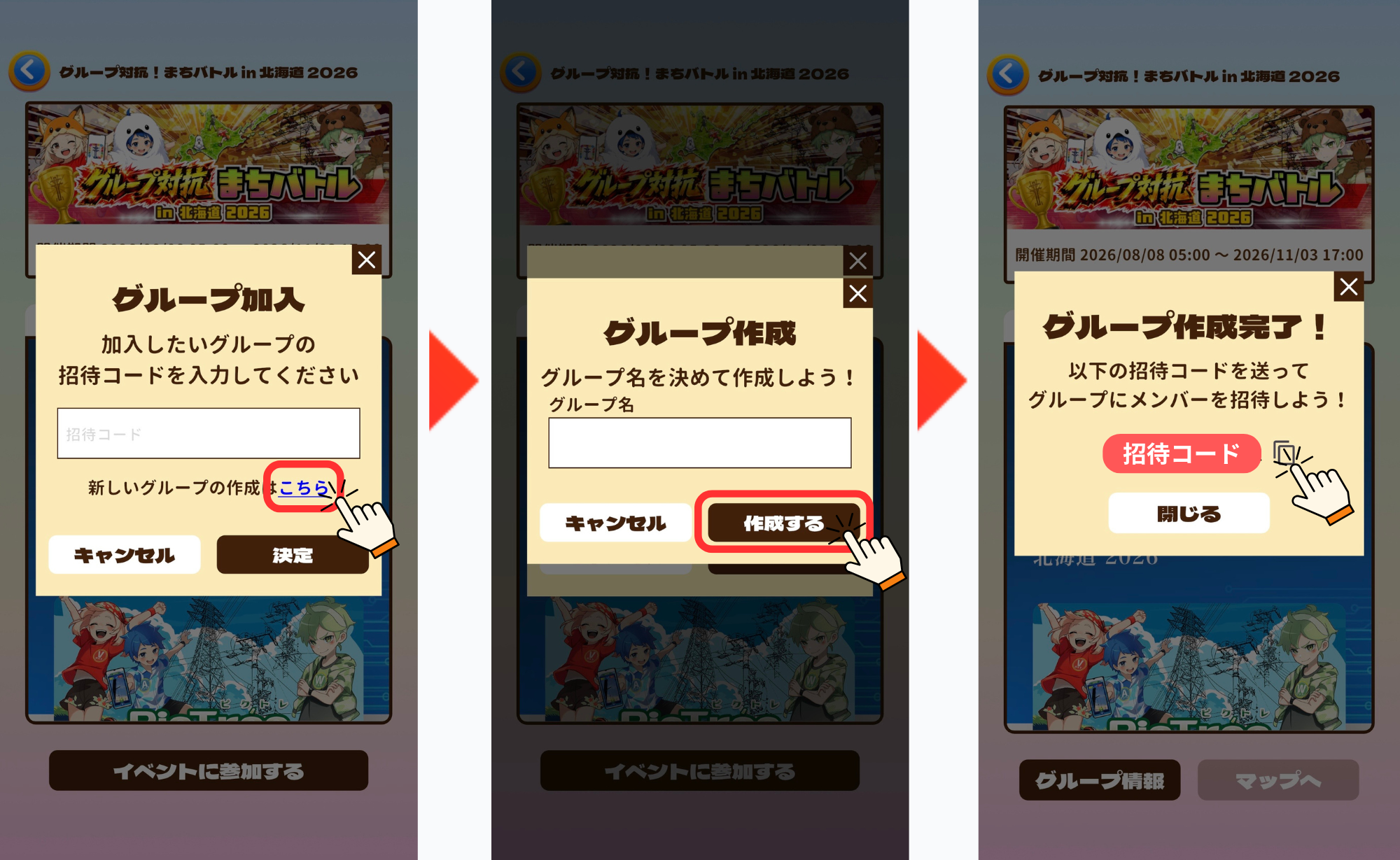
④ Tap “Create a new group here.”
⑤ Enter a group name and tap “Create.”
⑥ Group creation complete! Once an invitation code is issued, share it with the friends you want to invite to your group.
●If you are joining an existing group:
Follow the same steps as above through ①–③.
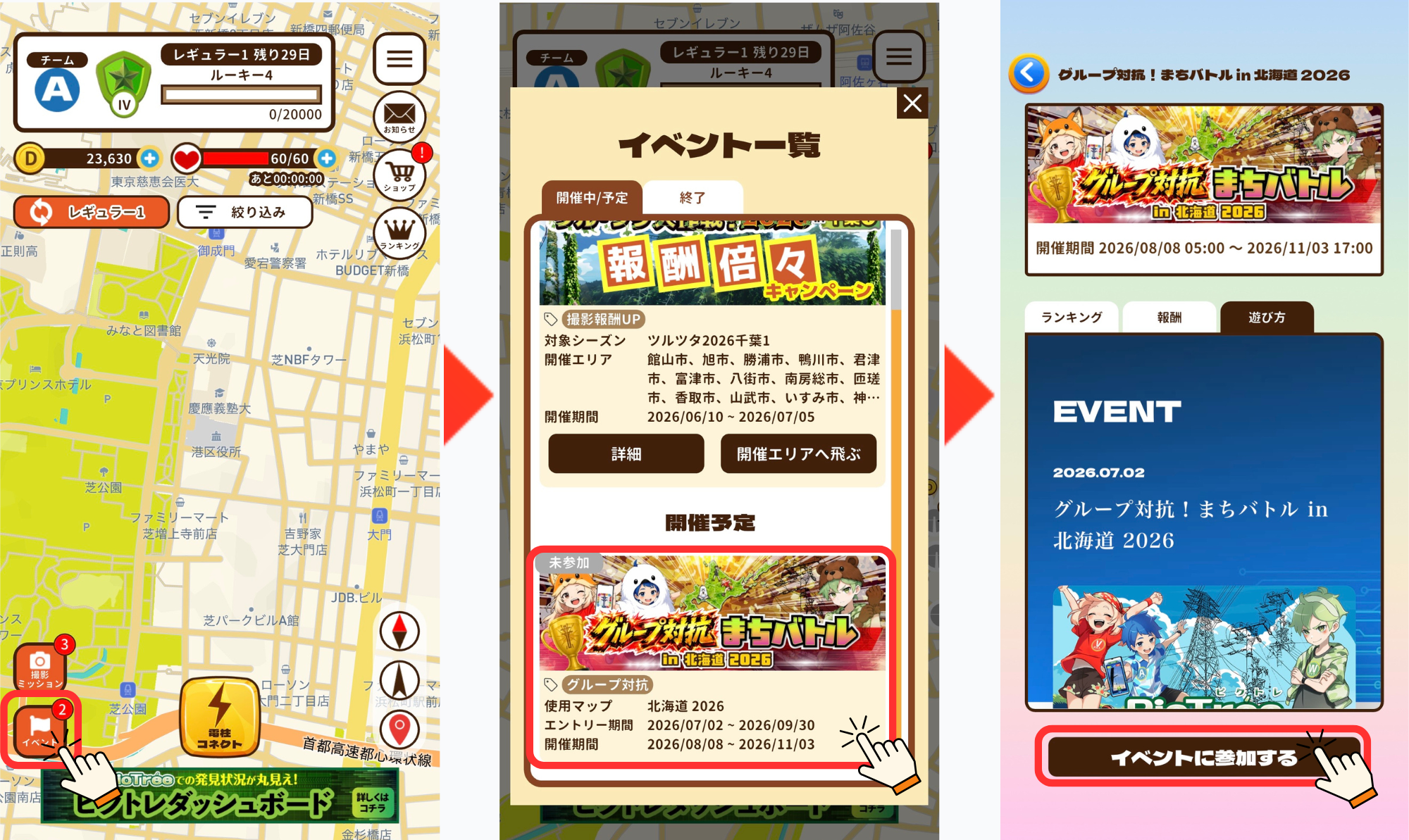
① After launching the app, tap “Events” in the lower left of the map screen.
② Tap “Group Battle! Machi Battle in Hokkaido 2026” in the “Event List.”
③ Tap “Join Event” at the bottom of the screen.
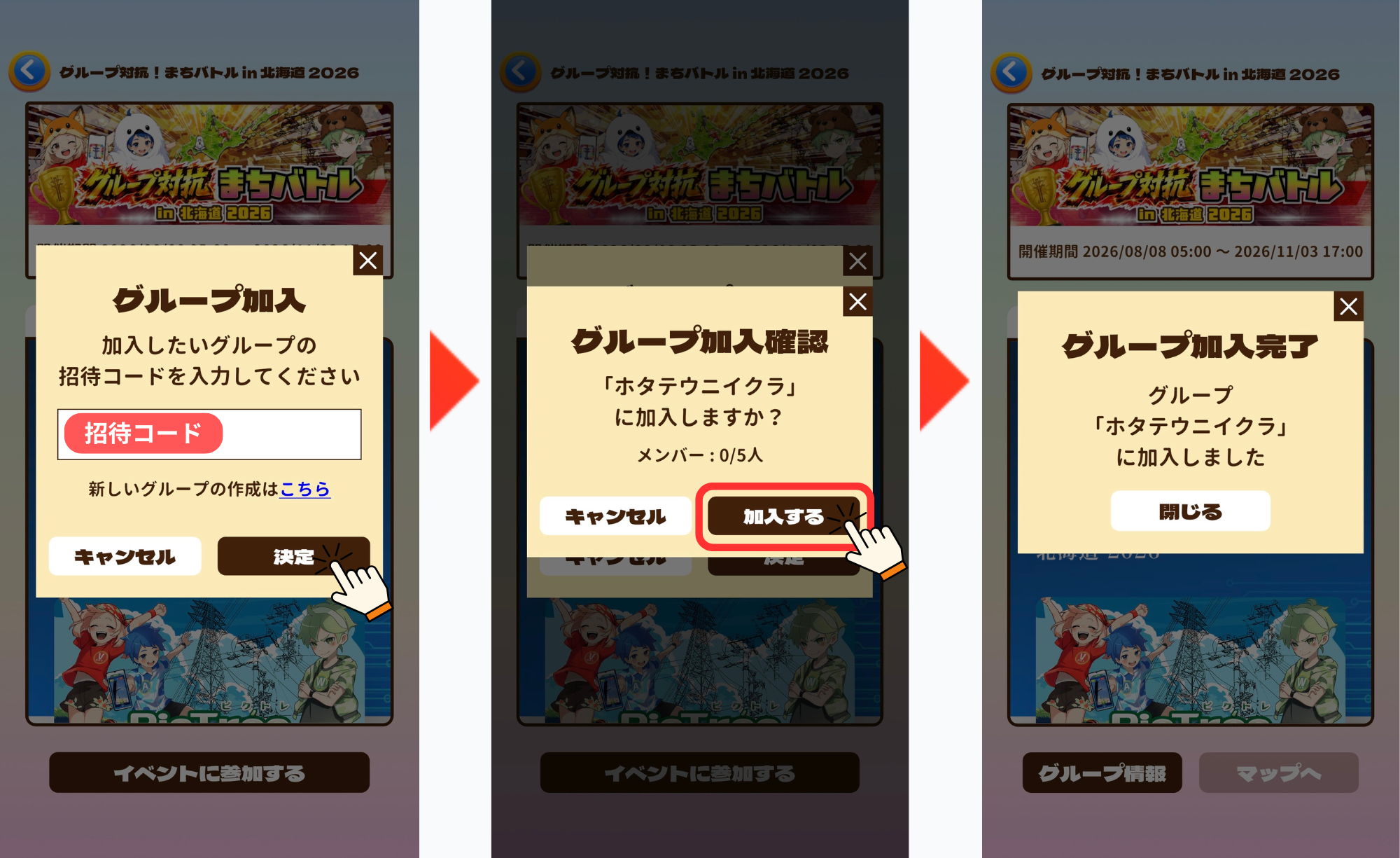
④ Enter the invitation code for the group you want to join and tap “Confirm.”
⑤ On the group joining confirmation screen, tap “Join.”
⑥ You have successfully joined the group!
◼️Group Information
On the group information screen, you can check the status of your group.
・Ranking Info: Ranking information for the team you belong to
・Activity: Displays the activity of members who have joined
・Members: List of current members
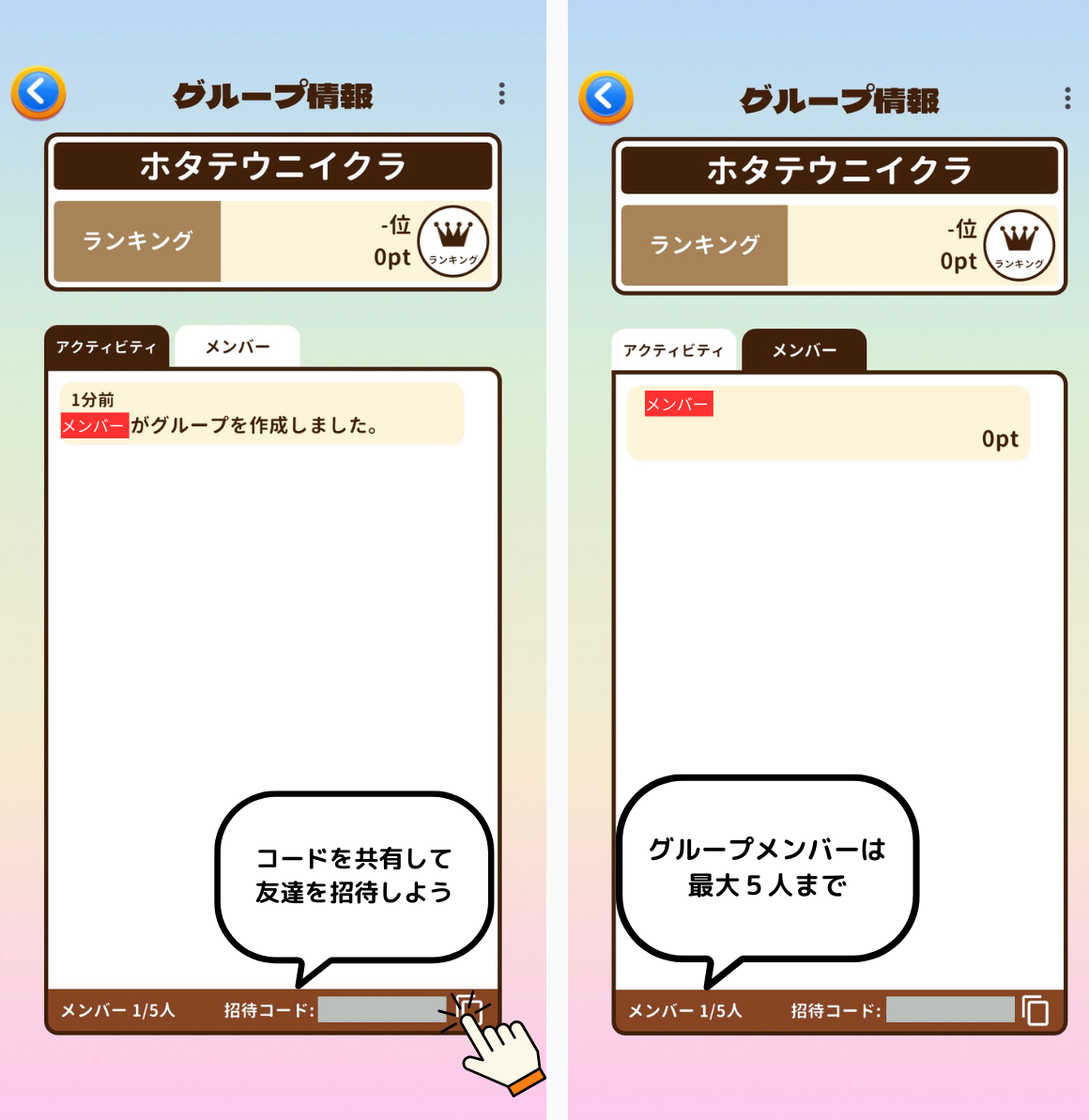
To invite friends to your group, share the invitation code shown in the lower right of the screen.
◼️Notes
・A group can have a maximum of 5 members.
・Each person can only belong to one group.
・You can create a new group, join, or withdraw as many times as you like during the entry period.